[CRM & Sales Enablement, Marketing Automation]
Automating lead qualification: lead scoring and HubSpot workflows

Reading time: 12min
05.11.2026

Every week, a B2B sales team receives leads of very uneven quality: the purchasing manager of a target mid-sized company requesting a demo, an independent consultant subscribed to the newsletter, a former prospect back on the pricing page after six months without contact. Without a shared criterion, sales reps call these leads back according to their place in the list or the company's reputation. The most promising ones then wait as long as the others, sometimes long enough to turn to a competitor.
Lead scoring ranks these contacts according to two criteria: their fit with the customer profile the company knows how to serve, and the recent interest they show in the offer. This ranking serves three purposes. Sales reps call first the contacts who meet both conditions. Marketing places in nurturing journeys those who have the right profile but no project yet, and sets aside those who are off target. Finally, the two teams share a written definition of a qualified lead, which reduces disagreements about the quality of the leads passed on.
Automating lead qualification means writing this definition with sales, then entrusting it to HubSpot: lead scoring measures each contact's profile and interest, and workflows pass qualified leads to sales reps within the agreed time. This article details the method, from choosing criteria to configuration in HubSpot.
Contents
- Qualifying a lead: the right customer, real interest, at the right time
- HubSpot's lead scoring tool: fit, engagement and combined score
- Building the model: four decisions, in this order
- From score to action: qualification workflows
- Which workflows to start with
- AI in qualification: smart properties and enrichment
- Keeping the model reliable over time
- Prerequisites before automating
- Customer case: La Poste Solutions Business
Qualifying a lead: the right customer, real interest, at the right time
A lead is qualified when it matches the customer profile the company knows how to serve (fit), shows measurable interest in the offer (engagement) and this interest is recent. A model that measures only one of these three conditions passes sales reps contacts who are not ready to buy. A student who downloads three white papers has high engagement and no fit. The CFO of a target account who opened an email eight months ago has a perfect fit, but interest too old to justify a call.
Yet many HubSpot portals do not make this distinction: a single score, fed for years, assigns for example 5 points to a page visit and 10 points to an industry, without anyone on the team being able to justify these values.
Qualification rests first on an agreement between marketing and sales. Marketing writes its definition of the MQL (Marketing Qualified Lead, a lead deemed ready to be passed to sales). Sales commits to a first-contact deadline and to giving reasons when a lead turns out to be bad. Lead scoring and workflows then translate this into HubSpot.
A company that cannot write its MQL definition in five lines has an internal disagreement to settle before any configuration, because no HubSpot setting will set this definition in place of the teams. At Markentive, the definition workshop with marketing and sales leadership always comes before configuration.
HubSpot's lead scoring tool: fit, engagement and combined score
The old “HubSpot score” property added positive and negative criteria into a single figure. The tool that replaces it has a dedicated space and covers three objects, according to HubSpot's documentation on the lead scoring tool:
- contacts, with Marketing Hub Professional or Enterprise;
- companies, with Marketing Hub or Sales Hub Professional or Enterprise;
- deals, with Sales Hub Professional or Enterprise, as a combined score only.
Three types of scores coexist. The fit score evaluates property values: job title, headcount, industry, revenue, country. It only changes if the record changes. The engagement score evaluates events: page visits, form submissions, interactions with marketing emails, meetings, calls made from HubSpot's calling tool. The combined score adds the two together while keeping a property for each component. We recommend it in almost all projects, because it lets you read profile and interest separately instead of merging them into a single figure.
Four mechanisms distinguish the current tool from the old property.
Decay. The value of an event decreases automatically as it ages, in steps of 1, 3, 6 or 12 months, by a configurable percentage. The score thus takes into account how old the interest is, without having to build a workflow to lower old points.
Group caps. Each group of criteria can be limited to a maximum number of points. If the “browsing” group is capped, ten visits to the pricing page are no longer enough to put a contact at the top of the list.
Multiple scores. The same object can carry several scores, for example one per product line or per geographic area. A company that sells software to finance departments and a service to HR departments no longer has to combine these two targets in a single weighting.
The threshold grid. The combined score places each contact in a cell from A1 to C3: the letter indicates fit (A for high, C for low), the number indicates engagement (1 for high, 3 for low). An A3 is a target account with no recent activity. A C1 is a very active but off-target contact. These two contacts do not call for the same treatment, and the label is enough for the sales rep to know it. The grid below gives an example of how contacts are distributed across the nine cells.
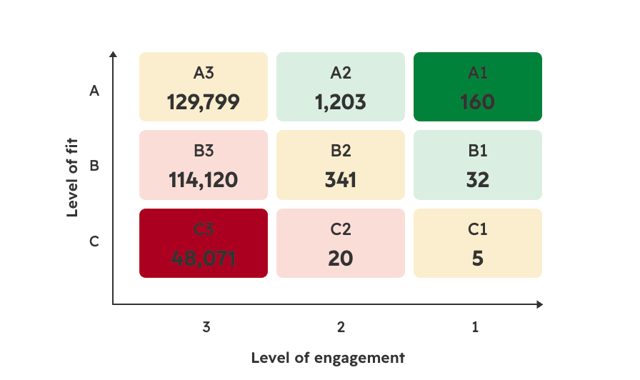
Example of contact distribution in a combined score threshold grid
Building the model: four decisions, in this order
A scoring model is built from won deals, because the customers who actually signed show which criteria predict a purchase. Starting from the list of properties available in the portal leads to weighting the fields that are filled in rather than the criteria that predict conversion.
First decision: fit, deduced from won deals. Export the deals won over the last 18 to 24 months and note the recurring characteristics: industry, headcount, main contact's job title, country. Weighting is based on the revenue generated by each characteristic. An industry that generates a significant share of revenue with few leads deserves a strong weight. An industry that supplies many leads and almost no revenue deserves a negative criterion, which removes points from the contact. Fit also encodes exclusions: competitors, students, personal email addresses, countries not served. These negative criteria are often forgotten, even though they spare sales reps a large share of useless calls.
Second decision: engagement, weighted by intent. A demo request signals buying intent; opening a newsletter signals attention at best. Three levels are generally enough. Buying signals include the contact form, the pricing page, the comparison page and replying to a sales sequence. Interest signals include downloading mid-funnel content, attending a webinar and viewing several product pages. Presence signals are limited to email opens and blog visits. The last two levels go into capped groups, and decay applies to all three.
Email opens call for a particular precaution. Since the deliberation of the CNIL, the French data protection authority, on tracking pixels, measuring opens depends on the recipient's consent and becomes partial, as explained in our article on email open tracking and the CNIL. An engagement score based mainly on opens will therefore underestimate a growing share of the database. Clicks, visits and forms remain reliable signals.
Third decision: thresholds, calibrated on the actual distribution. HubSpot displays a preview of the score distribution before activation, and thresholds are set from this screen. If a large share of the database falls into the high zone, the threshold is too low and sales reps will receive more leads than they can handle in the very first week. The rule we apply: the number of leads in the zone to be handled must match the sales team's capacity within the agreed time. In the example grid shown above, choosing A1, A2 and B1 as the MQL threshold places 1,395 contacts in the zone to be handled, out of nearly 294,000 scored contacts: the sales team must be able to call these 1,395 contacts within the agreed time, otherwise the threshold needs to be tightened. The same example places more than 99% of contacts in low engagement (column 3), because most contacts in an old database have had no recent interaction and decay reduces the value of old interactions. This distribution is normal and does not signal a flaw in the model.
Fourth decision: the scored scope. The tool lets you score a specific segment or exclude segments. Excluding customers, partners and employees from the outset prevents these contacts from distorting a score designed for prospecting. This omission often explains leads presented as priorities that sales reps find inconsistent, for example an existing customer passed on as a new prospect.
From score to action: qualification workflows
The score indicates which contacts to handle first, but it does not pass anything to sales reps. Workflows assign the lead, inform the sales rep and monitor the handling time. Four families of workflows cover this handoff.
Moving to MQL
When a contact reaches the agreed threshold, for example cells A1, A2 and B1, a workflow moves them to the MQL stage of the lifecycle property and sets their lead status property to “New”. Two design rules avoid the most frequent errors. First, the trigger is the grid label rather than the raw score: the raw score changes with every event and every decay step, whereas the label only changes when a threshold is crossed. Second, no workflow moves the lifecycle back down, because this property records the history of the relationship and is used for conversion analyses.
The sales status belongs to sales. In HubSpot, the lead status property holds it: the sales rep updates it as conversations progress, up to “Open deal” or “Unqualified”.
Routing to the right sales rep
The qualified lead must reach the right person, with the useful context, within the agreed time. The workflow assigns an owner by territory, industry or rotation, creates a task with a due date and notifies the sales rep by email or in Slack. The content of the notification determines how quickly the lead is called back. An alert limited to “New MQL” forces the sales rep to open the record to judge urgency, and it is often put off until later. An alert that specifies the grid cell, the account profile and the latest actions (“B1, industrial mid-sized company, two visits to the pricing page and a customer case request yesterday”) lets them decide immediately to call.
In more complex organizations, routing includes a workload check: beyond a set number of open leads, a sales rep temporarily leaves the rotation. This rule is configured in a standard workflow, without development.
Nurturing by grid cell
The A1-C3 grid directly provides the entry criteria for nurturing journeys. A3s and B3s, which have a good profile and little recent activity, call for account-adapted reactivation nurturing rather than the general newsletter. C1s and C2s, very active but off target, should not be passed to a sales rep: a workflow directs them to a self-service journey or excludes them. Leads disqualified by sales for lack of a short-term project go back into nurturing with a follow-up date.
Monitoring handling time
The last workflow is rarely built, even though it ensures the agreement between marketing and sales is respected. It spots an MQL not handled within the agreed time, alerts the sales manager and, if necessary, reassigns the lead. Without it, a missed deadline remains invisible until the monthly review.
These four families of workflows are part of the pipeline-oriented B2B marketing automation architecture we deploy for our clients, of which scoring is the first step.
Which workflows to start with
Opening all workflows at the same time makes errors impossible to attribute. If sales reps dispute the leads they receive, nobody knows whether the problem comes from the threshold, routing or nurturing. We therefore deploy in three waves, according to an explicit criterion: first open the automations that make the setup measurable.
- First wave: moving to MQL, routing and handling time monitoring. These three workflows apply the agreement between marketing and sales, and produce the data everything else depends on: time to first contact, acceptance rate by sales, disqualification reasons. They open together, as soon as the score is activated.
- Second wave, one to two months later: nurturing by cell and recycling disqualified leads. Their configuration depends on the disqualification reasons collected during the first wave.
- Third wave: multiple scores, AI-generated scores and smart properties. It requires a stabilized model and a sufficient conversion history.
Three automations remain disabled: the first until the model has proven itself, the other two permanently. The first is automatically enrolling a contact in a sales sequence sent in the sales rep's name, based on the score alone: with a poorly calibrated threshold, emails go out in the team's name to off-target prospects. It is opened when the MQL acceptance rate by sales has been stable for a quarter. The second is automatically demoting the lifecycle stage, which erases the history needed for conversion analyses. The third is assignment based on the raw score, which makes a lead change owner as decay occurs.
AI in qualification: smart properties and enrichment
AI brings two concrete uses to qualification. It turns information the CRM already contains as text into structured data. It completes knowledge of the account from external sources.
Smart properties to score expressed needs
A large share of the information useful for qualification sits in free text: a form's “your project” field, call transcripts, emails, sales reps' notes. Scoring cannot use it until it is converted into structured values. Breeze actions in HubSpot workflows, in particular “Data Agent: Fill Smart Property”, fill in a property from this content. They are available in the Professional and Enterprise editions and consume HubSpot Credits, according to HubSpot's documentation on AI in workflows, which cites lead qualification from forms and calls among the intended uses.
Applied to scoring, the principle is to have AI extract a few properties with closed values: project timeline (less than three months, three to twelve months, no project), tool currently used, main need expressed. These properties then become fit or engagement criteria like any others. A prospect who writes in a form “we are replacing our CRM before the end of the year” thus receives the points their request justifies, whereas a classic score has no way of reading this sentence.
Four safeguards determine the reliability of the setup. The property calculated by AI remains separate from the property entered by a sales rep, so that human input is never overwritten. Each calculated property carries its calculation date and is recalculated when the source material changes. Workflows include a default branch for empty values, which are frequent when the source text is thin. Finally, only properties with closed values serve as score criteria; free text generated by AI never does.
External enrichment to complete fit
A fit score is only reliable if the properties it evaluates are filled in. External enrichment, native with Breeze Intelligence or provided by a third-party vendor, completes headcount, industry, revenue and technologies used; we compare these options in our article on CRM data enrichment with Breeze.
Two external signals also improve qualification. Intent signals indicate that a company is viewing content related to the offer even before filling in a form. Job changes are even more neglected: a former user of the solution who joins a target account arrives with fit and interest already established, but remains invisible as long as nobody tracks contacts' moves.
Enrichment has a cost, in credits as well as in subscriptions. We enrich a defined segment, for example target accounts and recent MQLs, never the entire database.
The limits of AI-generated scores
In Marketing Hub Enterprise, HubSpot can suggest criteria and weightings based on the portal's history, provided there are at least 50 contacts, including 25 converted and 25 not converted. The tool is useful for kick-starting a model or challenging the team's intuitions. It does not replace the workshop with sales, because it learns from past conversions, including those the company no longer wants to reproduce: a segment that was profitable two years ago and abandoned by the current strategy will continue to be favored.
Keeping the model reliable over time
A scoring model delivered and then never reviewed loses its relevance within a few months, because targets, website pages and the makeup of the sales team change while the criteria stay fixed. Three indicators are enough to manage it.
The MQL to SQL conversion rate by grid cell. If A1s convert barely better than B2s, fit is poorly weighted. If C1s convert, the definition of fit itself needs to be revisited.
The time to first contact after moving to MQL, compared with the agreed time. This indicator belongs to sales and determines all the others. A quality lead called back after nine days has often lost the interest that prompted their request, or has turned to a faster competitor.
The disqualification reason entered by sales on each rejected lead. A closed list of reasons (off target, no short-term project, competitor, unreachable, student) directly points to the negative criterion the model is missing. This reason is entered in a dedicated property when the sales rep sets the lead status to “Unqualified”.
The score history on the record shows which events counted, and testing a record simulates the effect of a weighting change before applying it. We review the model every month for the first three months, then every quarter, with two or three adjustments at most per review. Beyond this pace, no adjustment has time to produce a measurable effect, and the team no longer knows which change explains which result.
A model's lifespan also depends on the support format chosen. Scoring delivered as a simple configuration project, with no handover or planned review, degrades as soon as the consultant leaves the project, because nobody internally knows the reason for each criterion. A provider limited to configuration suits a team that already has a RevOps manager able to take over the model. It does not suit an organization setting up its first scoring. In our CRM integration projects, each criterion is documented with its reason and source, a model owner is appointed on the client side, and the reviews of the first three months are part of the scope.
Prerequisites before automating
Lead scoring calculates its points from CRM data: when this data is incomplete or wrong, the scores are too. Three prerequisites determine the result.
Fit properties must be filled in. A score based on headcount and industry makes no sense if these fields are empty for most companies, so enrichment comes before scoring.
Lifecycle stages must be defined, with written entry criteria. Without them, the workflow moving contacts to MQL has no rule to apply.
The database must be deduplicated and cleared of internal contacts and invalid addresses. Otherwise, the score distribution is distorted from activation.
An organization that does not meet these three conditions would do well to postpone scoring by two months and devote that time to data. This postponement delays the first results, but it avoids rebuilding the model in the first quarter and losing sales reps' trust, which takes a long time to regain once the first leads passed on have turned out to be bad.
Customer case: La Poste Solutions Business
La Poste Solutions Business (postal and logistics services, more than 1,000 employees) was facing a poorly structured digital strategy, tools that were not interconnected and insufficient lead qualification. Markentive started with strategic scoping and a data management strategy. The team then built a form strategy geared toward qualification, scoring logic based on contacts' maturity to prioritize sales actions, and automated journeys for each stage of the conversion funnel. Finally, HubSpot was integrated with internal tools to streamline the handoff of leads to the sales teams.
The order of the work follows the method described above: data and forms first, scoring next, workflows last. Results published in the La Poste Solutions Business customer case: the volume of new contacts multiplied by 4, 3.5 times more leads passed to the sales teams and an 82% increase in opportunities generated by marketing.