
[CRM & Sales Enablement, Data & CRM]
Operations Hub is now Data Hub: clean and automate your HubSpot data before AI

Reading time: 8min
11.13.2026

In September 2026, HubSpot introduced its fall release with a blunt statement: "Nothing works right if your CRM is out of date" (Business Wire, Fall '26 Spotlight). The same announcement introduced a score that measures how complete the context available to agents is. A year earlier, at INBOUND 2025, HubSpot had replaced Operations Hub with Data Hub.
Both announcements address the same problem.
An AI agent, whether native like Breeze Customer Agent and Prospecting Agent or external like Claude connected to the portal, reads the CRM's properties and associations, then acts on them. When the same company exists three times, the agent summarizes a third of the relationship. When the country is entered as free text, the segment "mid-sized manufacturing companies in France" misses some of the accounts it should include, and the prospecting agent works from an incomplete list without flagging it.
This article covers the Data Hub (formerly Operations Hub) tools used to restore data quality, the order in which we use them, and the automations that keep the database from degrading again. It covers the Professional and Enterprise editions.
Contents
- Operations Hub is now Data Hub: the scope in 2026
- How inconsistent data distorts an agent's work
- Cleaning up: four workstreams, in an order that limits irreversible mistakes
- Automating to keep the database clean
- Clean data lets AI produce new data
- Limits and costs to know
- Where to start
- Customer case: defining the key data before automating
Operations Hub is now Data Hub: the scope in 2026
HubSpot presents Data Hub as a hub that brings together data from external sources and provides AI tools to connect, clean and act on it. The historical core of Operations Hub remains:
- two-way synchronization with other applications (Data Sync);
- programmable automation, meaning JavaScript or Python code run as a workflow action;
- data quality tools and datasets for reporting.
The additions mainly concern assembly and detection. Data Studio combines, in a spreadsheet-like interface, data from Google Sheets, Excel files or data warehouses such as Snowflake (Data Studio product page). Duplicate management gains customizable detection and merge rules. The Enterprise edition adds connections to data warehouses and storage platforms, advanced metrics and secure data sharing (Data Hub product page).
The new name corrects a common misunderstanding. Many leadership teams read "Operations" as a tool reserved for operations teams and left it out of license decisions. "Data Hub" describes its purpose more clearly.
Our position: for an organization planning to deploy AI agents within the next twelve months, Data Hub Professional belongs in the AI budget, not the tooling budget. Agents read the data this hub maintains. Funding the agents without funding the quality of that data means accepting wrong answers on part of the accounts.
For budgeting, Data Hub Professional starts at €720 per month and Enterprise at €2,000 per month, excluding VAT, with one seat included on annual billing, according to the pricing detailed in our HubSpot pricing guide.
How inconsistent data distorts an agent's work
An agent does not check the data it reads. It treats it as reliable information and produces a confident answer, even when the record is wrong or incomplete. Database defects therefore end up in answers, segments and actions, with no warning signal.
Three defects come up in most of the portals we take over.
Duplicate companies. Activities, deals and tickets are spread across two or three records. An agent preparing a meeting sees only one record, and therefore only part of the history. A prospecting agent may contact an account that is already a customer. HubSpot documents one cause itself: automatic deduplication by domain name does not apply to companies created through the API (HubSpot knowledge base). Any integration that creates companies without first searching for an existing record therefore produces duplicates, continuously and without any visible error.
Inconsistent formats. "France", "FR", "france" and "Fr." in the same text property; job titles entered freely; phone numbers with and without country codes. Segment filters, and therefore agents' targeting criteria, match exact values. A misspelled value excludes the record.
Competing properties. Three "Industry" properties created at different times, only one of which is still populated. A person knows which one to check. An agent, or Claude queried by a sales rep with their own permissions, may read the wrong one.
Some of these defects stem from the choice of service provider. A sync put into production without a unique key or a priority rule between the two systems runs for months before the duplicates become visible. This kind of error is less about technical skill than about fit: an integrator who configures a connector without knowing the company's data project lacks what is needed to choose the right key. At Markentive, every sync is documented with its unique key, its priority direction and its owner before go-live.
Cleaning up: four workstreams, in an order that limits irreversible mistakes
The order matters more than the tool. We rank the workstreams by a simple criterion: a mistake made at step N must be correctable before step N+1. Merging duplicates, which cannot be undone, therefore comes after normalization, which can be rerun safely.
| Workstream | Data Hub tool | Required edition | Reversible |
|---|---|---|---|
| 1. Settle the reference properties | Data quality overview, property management | Data Hub Professional or Enterprise | Yes (archiving) |
| 2. Normalize formats | "Format data" workflow action | Data Hub Professional or Enterprise | Yes, if the original value is kept |
| 3. Deduplicate | Duplicate manager, custom rules | Data Hub Professional or Enterprise for bulk processing | No |
| 4. Close the entry points | Unique-value properties, import rules, integrations | Depends on the hub | Yes |
1. Settle the reference properties
Before correcting a value, you need to decide which property is authoritative. For each piece of information agents use (industry, country, headcount, customer status, owner): a single reference property, an expected format and an owner. Competing properties are archived once their useful values have been carried over. This workstream is the least technical and the one most often skipped.
2. Normalize formats
The "Format data" workflow action, in the Data ops section of the actions panel, covers most routine corrections: capitalization, extra spaces, HTML tags, character replacement, date format, rounding. Around twenty options are available, and a custom mode accepts formulas, for example to strip dashes and asterisks from a phone number (HubSpot knowledge base). It requires Data Hub Professional or Enterprise.
We first write the result to a temporary property, compare a sample, and only then replace the original value.
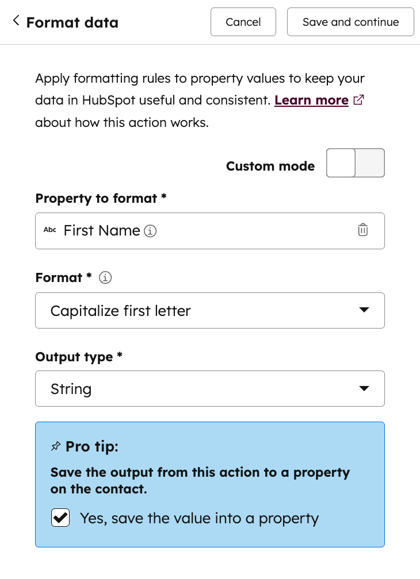
Configuring the "Format data" action in a workflow. Source: HubSpot knowledge base
3. Deduplicate
The duplicate manager compares property values daily to suggest likely pairs: first name, last name, email, phone, postal code and company name for contacts; domain, name, country, phone and industry for companies (HubSpot knowledge base). Normalization in the previous step therefore directly improves the quality of the suggested pairs.
Professional editions of any hub let you handle duplicates one by one. Data Hub Professional or Enterprise adds bulk processing (up to 30,000 pairs in Professional, 100,000 in Enterprise), custom detection rules (two per object, nine properties each), merge rules that set which value is kept property by property, and the audit log.
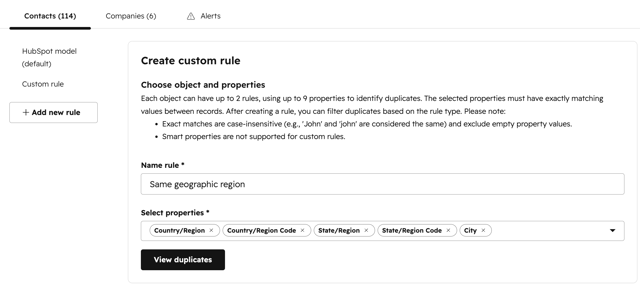
Creating a custom duplicate detection rule. Source: HubSpot knowledge base
One rule has no exception: a merge cannot be undone. We never merge in bulk before checking the rules on a few hundred pairs, and we configure the merge rules before the first merge, not after.
4. Close the entry points
A cleanup that does not address the sources of pollution has to be redone a few months later. Three entry points need closing: unique-value properties (up to ten per object) for identifiers such as a company registration number or an ERP ID; rules applied to imports and forms; and integrations that create records through the API, which should be reconfigured to search for an existing record before creating one.
Automating to keep the database clean
Once the database has been cleaned, the goal changes: every new record must arrive in the right format without human intervention.
Maintenance workflows are triggered by the creation of a record or a change to a tracked property. They apply "Format data", fill in a default value when the field is empty, and create a task for the owner when the correction requires human judgment (an ambiguous industry, a company without a domain).
When the native action is not enough, programmable automation takes over: a custom code action can compare a value against an internal reference list, call a business tool's API or compute a matching key. Our rule here: every code action has a named owner and documentation, otherwise it becomes debt that nobody dares to touch. We reserve it for cases where no native action fits.
One common incident is worth anticipating. A workflow that reformats a property can conflict with a sync that rewrites the original value from the other system, and the two keep overwriting each other on every pass. The fix is to define, in the sync, which system is authoritative for each field before activating the workflow.
For reporting, Data Studio and datasets combine data from several sources without duplicating it in the CRM. HubSpot credits are consumed when data is synced outside Data Studio; the other Data Hub features are included in the subscription (Data Hub product page FAQ).
Our SalesOps & Data team supports precisely these two phases: the cleanup, then the automations and governance that make it last.
Clean data lets AI produce new data
A cleaned-up database makes possible two uses of AI that create usable data, provided the database they rely on is reliable.
Properties calculated from unstructured material
The CRM holds a lot of information that sits in no property: call transcripts, emails, meeting notes. The Data agent's smart properties answer a business question asked about each account ("Does the account use SAP as its ERP?", "What priority did the customer express in the last conversation?") from these sources and the web, and write the answer to the record at a set refresh frequency. HubSpot charges $0.10 per answer in credits (Data agent product page).
The point is to connect workflows and personalization to a structured property rather than to free text, as we explain in our article on B2B marketing automation workflows. Our safeguards: a calculated property is never edited by hand (a separate property exists for human correction), it is dated, and any workflow that uses it includes a default branch for empty values.
Targeted external enrichment
The second use completes the record with external information: headcount, technologies, news, intent signals and, above all, job changes, the most profitable and most overlooked sales trigger. The Data agent charges $0.10 per company per month for buyer intent tracking and $0.50 for custom signals. These amounts add up quickly: we enrich a defined segment, never the whole database. Our article on CRM data enrichment with Breeze details the rules to set so the database does not get polluted.
One limit remains: a generated property is not an accurate property. A sample check is still needed before relying on it for a routing or priority decision.
Limits and costs to know
- Merging is final. HubSpot states it in its documentation: a merged record cannot be restored.
- "AI" duplicate detection remains poorly documented. The product page mentions AI that identifies duplicates more accurately and can merge automatically based on your preferences. The knowledge base mentions a detection "model" and a similarity score, without explaining how it works or how automatic merging is configured. We treat it as a sorting aid, not as a decision.
- Bulk processing volumes are capped at 30,000 pairs in Professional and 100,000 in Enterprise. A portal with several hundred thousand contacts and ten years of history has to be processed in several passes.
- Credits add up. Syncs outside Data Studio, smart properties, signals: each use is modest, but their total on a poorly targeted database is not.
- A completeness score does not measure accuracy. The context score announced in fall 2026 shows which information is missing. A record completely filled with outdated values gets a good score.
- Data Hub does not appoint an owner. The tool detects and corrects; it does not decide who settles a conflict between two contradictory values.
Where to start
A single sequence, in this order:
- Choose the first targeted AI use case (support replies, meeting preparation, prospecting) and list the objects and properties it reads. The scope of the cleanup follows from this list, not from the whole portal.
- Settle the reference properties within this scope and archive the competing ones.
- Normalize with "Format data", keeping the original value.
- Deduplicate, with rules tested on a sample before any bulk processing.
- Close the entry points and activate the maintenance workflows.
- Open the agent, read-only first, then add smart properties and enrichment on a segment.
The main limit of this method is how long it lasts. A cleaned portal degrades again if nobody is responsible for maintaining it: data quality requires a designated owner and recurring time, just like campaign management.
Customer case: defining the key data before automating
Our work with La Poste Solutions Business began with strategic scoping to clarify objectives and identify the key data, in a context where the tools did not communicate with each other. Forms, workflows and scoring came next, followed by the integration of HubSpot with internal tools. Published results: four times as many new contacts generated, 3.5 times as many leads passed to sales teams and 82% more opportunities generated by marketing.
Learn more
- CRM data enrichment with Breeze: the rules for enriching a database without polluting it, once the cleanup is done.
- Connecting Claude to HubSpot without losing control of your data: the permissions to grant and the use cases to open first when an external assistant reads the CRM.
