[HubSpot]
UNBOUND 2026: the HubSpot announcements that matter, and those that can wait

Reading time: 7min
30.09.2026

With UNBOUND 2026, HubSpot is changing the place of AI in its product. Until now, it sat in a few tools: a prospecting agent, a service agent, a writing button in the email editor. It is now installed underneath the entire portal, and all agents read the same reference base about the company. The consequence for a team deploying AI in HubSpot is direct: the quality of results now depends on the context provided and the cleanliness of the data, far more than on the choice of agent.
This article covers three points: the building blocks of this new foundation, the three agents worth testing this fall, and the announcements that are not ready yet or whose cost needs to be anticipated.
The foundation: a shared reference base, a console, a management screen
The Context Center
This is the new feature to deal with before all the others. The Context Center is where the company describes the information each agent needs: business, offer, market and competitors, personas and segments, teams, sales process, qualification method. The portal's agents read it before answering. It is available on all subscriptions and does not consume credits.
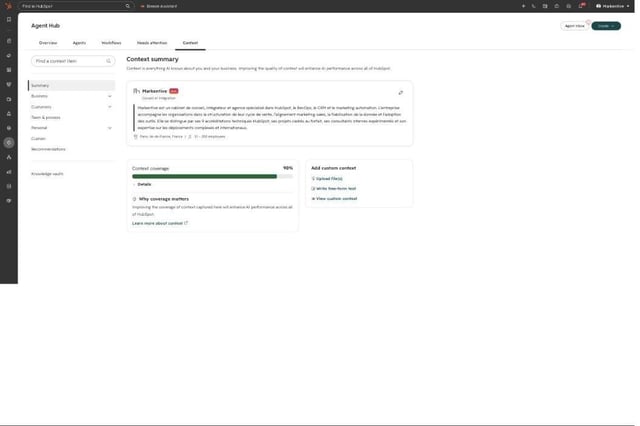
An objection often comes up: the portal already contains personas, segments and pipelines, so why describe them a second time? Because this information is scattered and rarely documented. A list has no description, a pipeline does not indicate the sales method, and no HubSpot object contains your list of competitors or your value proposition. If nobody writes it down, the agent reconstructs it from emails and notes, with each sales rep's approximate vocabulary.
Our position is simple: an agent deployed without a completed Context Center should not be evaluated, because its generic answers say nothing about its real quality.
Breeze Assistant
The assistant keeps its name but has been rebuilt. It now creates reports, workflows, campaigns and agents from a written request. It connects to Asana, Notion, Linear, Amplitude and G2 to read information and take action there without leaving HubSpot. It runs scheduled prompts at regular intervals, shares its deliverables through a protected link, accepts voice commands in the mobile app and works in Gmail.
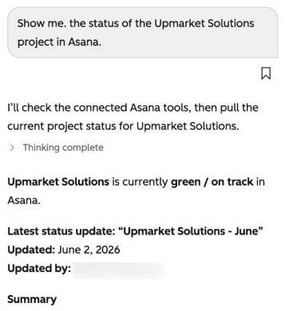
Many of our clients had tried it a year ago and then dropped it. The current product justifies a second try, because HubSpot is making it the main entry point to the portal: new features arrive through the assistant first, before arriving in the menus.
Agent Builder and Agent Hub
Agent Builder turns an existing workflow into an agentic workflow, or creates an agent described in natural language. A qualification agent, for example, can score an incoming lead against the personas described in the Context Center before passing it to the sales rep. Agent Hub groups all the portal's agents by business objective, with their metrics, their credit consumption and the actions awaiting approval. We have detailed how it works in an article dedicated to Agent Hub.
Three agents worth testing this fall
Marketing: the nurturing agent
Until now, personalizing nurturing meant stacking smart content by segment and personalization tokens. All contacts in the same segment received the same email, with their first name and their company name.
The nurturing agent rewrites a workflow's automated email for each recipient: subject line, preview text, body and call-to-action button. It relies on contact and company properties, on the activities you select and on the configured brand voice. Before sending, a view compares the original text with the rewritten text. By default, only half of the recipients receive the personalized version, and a report compares the open and click rates of the two versions.
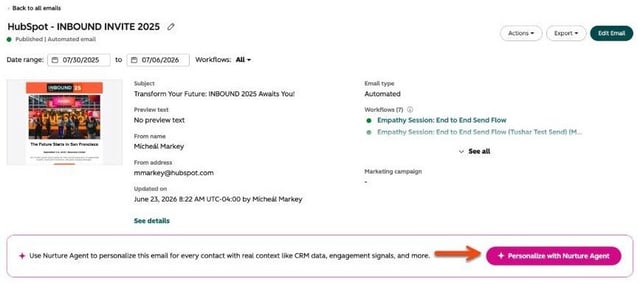
The main value lies in the source of the information. The agent uses the CRM's unstructured data: email exchanges, call transcripts, submitted forms. A competitor can read your prospect's website or LinkedIn profile, but has no access to these exchanges. Personalization therefore relies on information only you hold, and this exclusivity sets it apart from an improved mail merge.
Requirements: Marketing Hub Pro or Enterprise, HubSpot credits, beta, cap of 20,000 personalizations per month.
Sales: deal progression
This is the announcement behind the phrase “a CRM that updates itself”. The agent reads emails, notes and meeting transcripts associated with contacts, companies and deals. It then suggests property updates (amount, close date, stage) and next actions: follow up, reply to an email received, schedule a meeting. You choose the properties concerned and, for each one, an automatic update or a suggestion the sales rep approves in one click.
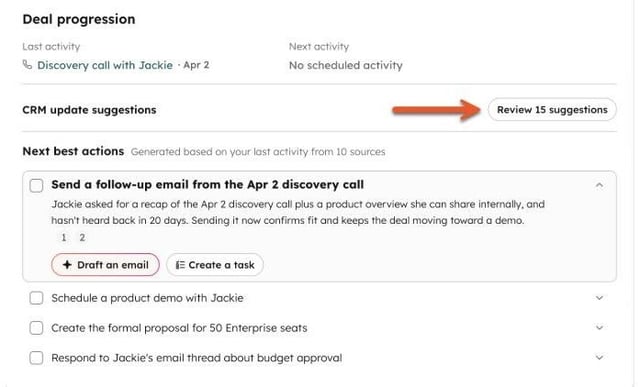
The stakes go beyond saving time for sales reps.
We make the same observation on the CRM projects we take over. An agent that takes care of data entry also produces up-to-date data, and all the portal's workflows and reports depend on this data.
The condition is a blocking one: activities must be recorded properly. If meetings are not transcribed, if emails are not associated with the right records, the suggestions are wrong and sales reps stop looking at them. We recommend starting in suggestion mode with a pilot team, correcting the context based on feedback, then automating only the properties whose suggestions are consistently right. Requirements: beta, Sales or Service Hub Pro and above, credits and user licenses.
Same logic on the finance side: the revenue management agent builds a reminder plan for each open invoice, whether created in HubSpot or synchronized from a billing tool, and adjusts it to the customer's replies. It is in beta, on all subscriptions, with credits.
Service: the customer agent and the knowledge base
The customer agent now answers on chat, email, forms, WhatsApp, Facebook and phone, the latter in beta with a number provided by HubSpot. When it cannot handle a request, it creates a ticket and transfers the conversation to a human according to the instructions you define. According to HubSpot, it handles 60 to 70% of incoming requests on average.
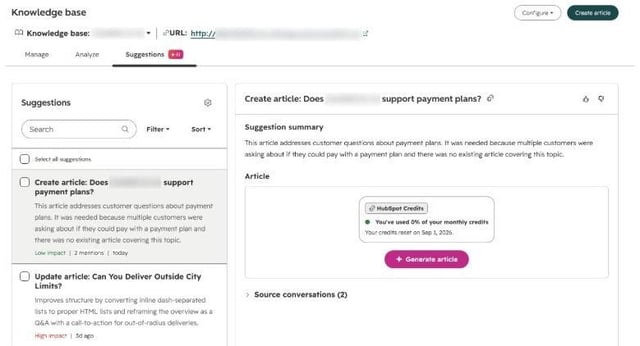
This rate depends almost entirely on the knowledge base, since the agent draws its answers from it. Hence the value of the new knowledge base agent: it analyzes resolved tickets and suggests creating missing articles or correcting outdated ones. Each article added increases the share of requests the service agent can handle on its own.
Deployment can remain gradual: testing on real customer questions before going live, activation on 10% then 30% of a channel's requests, and a supervision mode where an advisor approves each answer before it is sent.
The zeop case: 93% of conversations handled without an advisor
Zeop, a telecom operator on Réunion Island, put its customer agent, named Zoé, into production in December 2025, after an eight-week project with Markentive. Measured in HubSpot over a rolling thirty days, the results are as follows: 93% of conversations are handled without transfer to an advisor, 77% are taken through to resolution by the agent, and 81% of answers are rated satisfactory by customers.
Three choices explain these figures. The project started by selecting the requests the agent can handle end to end (billing, usage, network coverage, options) and by auditing the data between HubSpot and the ERP. The agent was then connected to the ERP via API so that it could act, not just answer: it sends the latest invoice, adds or removes an option, checks whether a network incident affects the customer, with explicit confirmation from the customer and double identity verification before each operation. Finally, the knowledge gaps flagged by HubSpot are reviewed continuously, and each review enriches the base the agent relies on.
Announcements not ready yet, and those that cost money
We checked the HubSpot knowledge base page of 36 major announcements. 18 are in beta, 12 consume credits, 13 require a paid user license on top of the subscription, and only 9 are open to all subscriptions. An announcement made on stage is therefore not a feature available in your portal, and an available feature is not necessarily included in your subscription. Before presenting a new feature to management, you need to check its status, its edition and its billing model. Public betas are activated in the portal settings, under Product Updates.
Credits. HubSpot lets you cap credit consumption for the portal and for each agent. We advise setting these caps before activating the first agent. Several companies have publicly shared credit bills far above their budget, because no cap had been set.
Marketing Studio and the campaign and content agents. The campaign agent produces a complete brief (objective, audience, segment, indicators, message) from an objective or a document, then prepares draft assets in Marketing Studio. The module was disappointing at launch. The current beta gives usable results when the brand voice and the Context Center are filled in, and generic results otherwise. We advise against promising it to a marketing leadership team before testing it on a real campaign.
The MCP server and external AI tools. The MCP server lets Claude, ChatGPT, Copilot or Gemini read and write in HubSpot, now including pages, campaigns, quotes and workflows. The Agent CLI, in beta, lets a coding agent run batch or scheduled tasks. Permissions remain those of the connected user. We have described the setup in Connecting Claude to HubSpot.
Should you then drive HubSpot from an external AI tool rather than from Breeze? For everyday use in the CRM, our answer is no, for two reasons. The first is technical: HubSpot receives the event first (form submitted, email received, stage change), and an internal agent reacts to this event with the portal's full context. An external tool has to go through webhooks and dedicated orchestration, and the MCP does not expose all data. The second is economic: external use adds the model provider's token costs to the HubSpot subscription, whereas internal use consumes only HubSpot credits. Token prices are not stable, and dependence on a model provider must be included in the budget.
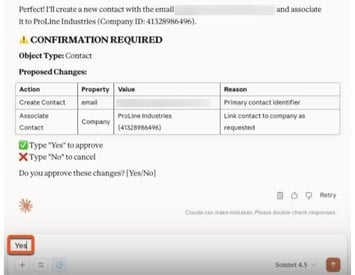
The external tool remains the right choice for bulk processing, such as migrating hundreds of pages to a new theme. A final clarification: confirmation before writing is documented for the Claude connector and for the Agent CLI's simulation mode, not as a rule common to all MCP clients. Check tool by tool.
Where to start
1. The Context Center. It is free, available, and all agents depend on it. Half a day with sales leadership, marketing and service is enough for a first version, and the effect shows the following week in Breeze Assistant's answers.
2. The data model. Properties, associations and activities determine deal progression, signals and all reporting. We carry out this work as a 14-module instance audit, run by Claude in read-only mode, which results in a cleanup plan that can be partly automated.
3. A first agent, on a measurable scope. Choose the agent whose result can be measured without debate: the prospecting agent if your challenge is pipeline, the revenue management agent if your invoices already go through HubSpot. Set a scope, a before-and-after indicator, and a credit cap from the start.
This sequence has one limitation: it assumes that someone is responsible for the Context Center over time. Without a named owner, the reference base is no longer updated after a few months, and agents answer based on an outdated offer and organization.