[HubSpot]
Prospecting Agent: buying signals, enrichment and outreach

Reading time: 11min
25.09.2026

In most teams, B2B outbound prospecting still relies on an old model: a list of accounts built each quarter, purchased or exported contacts, a five-email sequence, and a response rate that falls every year. The sequence is not the main cause of this decline. The cause is the timing: you write to a company because it is on a list, not because a recent event at that company justifies reaching out.
HubSpot's Prospecting Agent was designed, in its 2025 version, as a prospecting email writer built into Sales Hub. In 2026, its function has changed. It monitors segments of companies for buying signals, identifies or sources the relevant contacts, then initiates personalized outreach that it follows up and stops on its own. Since April 14, 2026, HubSpot no longer charges for it by subscription but per recommended lead. Since the Fall Spotlight presented at UNBOUND on September 16, 2026, it monitors more than 40 signals, reconstructs the buying group around an opportunity and can be triggered from the new Breeze Assistant.
This change of pricing model is what changes a sales leadership team's reasoning. An agent that writes better emails remains an individual productivity tool. An agent billed per recommended lead, which decides on its own when an account deserves outreach, becomes a budget line managed through targeting rules. The quality of these rules, not the quality of the writing, determines the return on investment.
This article details the three building blocks in the title, in the order in which the agent executes them: signal detection, contact enrichment and sourcing, then outreach. It then covers the real cost in credits and the governance prerequisites without which the agent produces recommendations in volume, billed, and few meetings.
Buying signals: the actual scope of monitoring
Two clarifications of scope first, because confusion is common. Signal monitoring and contact sourcing are still in public beta at the time of writing, activated by a super admin (see HubSpot's documentation on buying signals in the agent, updated on August 25, 2026). And this experience replaces the spring sales profiles with plays: a play combines a segment of companies, signals to monitor, personas to target, a sales context and an outreach strategy. Portals that had configured sales profiles now see both logics coexisting in the same interface.
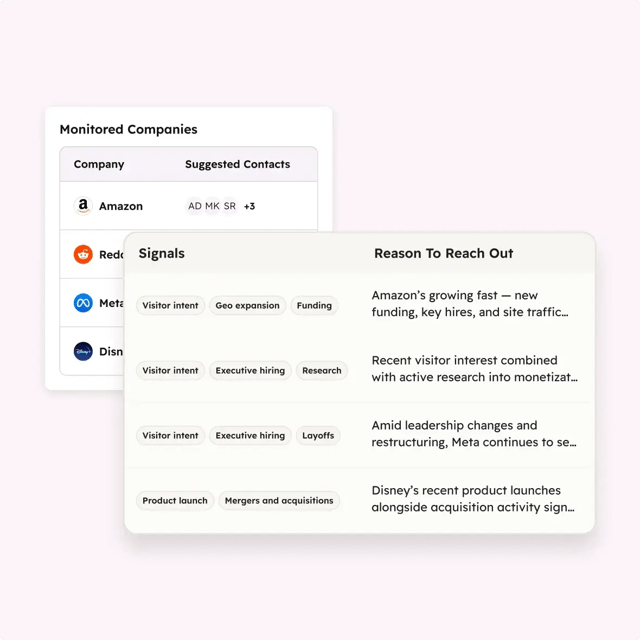
The principle is as follows. You define one or more company segments matching your ICP, enable the “Source contacts for me” option, and the agent monitors these companies continuously. A “Monitored companies” table lists the tracked accounts, the signals detected for each, the suggested contacts, the reason for the recommendation and the date of last contact. This monitoring is not free: it falls under HubSpot's Buyer Intent pricing, at 10 credits per monitored company per month for standard signals, and 50 credits per month for a custom signal (see the section on cost). The agent's outreach recommendation is billed on top, when it is issued.
The official documentation distinguishes two families of signals. News signals first: funding rounds, product launches, leadership changes, acquisitions, technology stack changes, hiring. Research signals next: evidence that a company is interested in topics related to your offer, defined by keywords or based on your own domain, and visits to your site identified by Breeze Intelligence (the “Visitor intent” signal, whose criteria you set). Since the summer, conversational signals drawn from emails and meeting transcripts associated with deals (key contact identified, pain point mentioned) have been added, along with the ability to define custom signals. The catalog now exceeds 40 signals, and its exact composition varies from one portal to another depending on the betas enabled.
Source: HubSpot
This catalog calls for a critical reading. A news signal is public, and therefore shared with all your competitors equipped with the same tool or an intent data provider. The account that has just raised funds will receive several prospecting emails the same week, including yours. The differentiating value lies in proprietary signals: a visit to your pricing pages, a need mentioned in a recorded call with another contact from the same group, the combination of a public signal and an engagement history in your CRM. Native integration with the CRM is the agent's real advantage over an external signals tool here. A poorly maintained portal cancels out this advantage, since the agent can only cross-reference a public signal with reliable engagement data.
The practical consequence for configuration is direct. A play built on a broad segment and public signals only will produce recommendations in volume, each one billed. A play built on a narrow segment, with at least one proprietary signal among the conditions, will produce far fewer recommendations and a higher response rate. We recommend starting with the second, even if the dashboard looks sparse in the first weeks.
Enrichment and sourcing: where the contacts come from
A signal detected at a company is not enough. You need a contact. The agent proceeds in two stages.
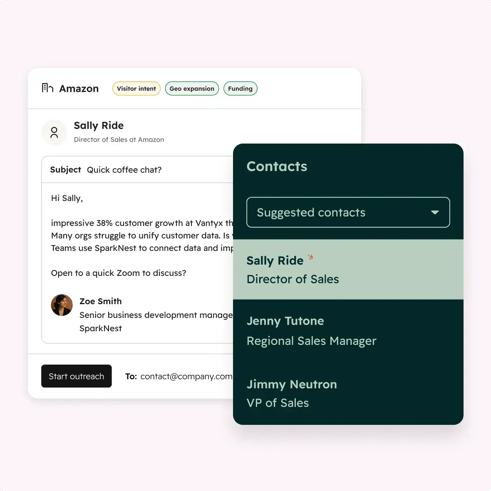
It first searches the CRM. For each flagged company, it identifies up to three existing contacts matching the personas defined in the play. This step creates nothing; it uses your database. It also uses its flaws: a contact with no job title or associated with the wrong company will not be selected, or will be selected wrongly. Since September, the agent can go further and reconstruct the buying group around an opportunity, meaning it identifies the various decision-makers and influencers in the same account rather than a single contact.
If the CRM does not contain the profiles sought, the agent can source new contacts from a connected data provider. Four integrations are documented by HubSpot to date: Apollo, Surfe, ZoomInfo and Seamless, with only one provider connected at a time. The contacts found are created in the CRM with their professional contact details, then enrolled in the play's outreach. The number of new contacts suggested per day is capped by a setting you control, and the agent often suggests fewer than the cap, since suggestions depend on the signals actually detected.
Source: HubSpot
This building block should not be confused with Breeze Intelligence enrichment. Enrichment completes records that already exist in your CRM (job title, industry, headcount, revenue, social links) from HubSpot's database, and market segments in beta let you add companies from a target market to the CRM. None of these features provides new named contacts at a given company: that is precisely the role of sourcing through a third-party provider. In a complete setup, Breeze enrichment prepares the database (identifiable personas, qualified companies), and sourcing fills the gaps account by account.
Three points deserve attention before activating sourcing.
The first is budgetary. HubSpot credits cover the agent's work, not the third-party provider's data. A contact sourced from ZoomInfo consumes a ZoomInfo credit under your contract with ZoomInfo, on top of the HubSpot credits billed for the recommendation. There are therefore two counters to track and two invoices to anticipate, which means informing the purchasing department on both sides.
The second is database quality. Sourcing creates records. Without a deduplication rule, a default owner and a company naming convention, these records add to a stock that is already hard to govern. The topic is covered in detail in our article on CRM data enrichment with Breeze: the same precautions apply, with one important difference: the prospecting agent then writes to these contacts.
The third is regulatory. B2B email prospecting to a named professional address remains possible in France on the basis of legitimate interest, provided the person is informed and can easily object. A contact sourced by a third-party provider and contacted by an autonomous agent has never been informed by you. An information notice and an unsubscribe link in the first email are therefore mandatory, and the contact's source must be recorded in a property to respond to an access request. Data protection officers in structured groups will ask the question; it is better to have the answer before activation.
Outreach: two modes, safeguards, and one main channel
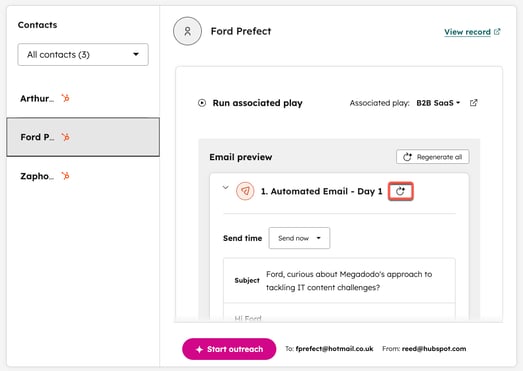
Once the contact is selected, the agent researches them (engagements over the last twelve months in the CRM, then website and news), writes a first email in the defined tone, then manages what follows. The settings fall into four families, which correspond to the tabs of the play editor.
Two outreach strategies
- Sequence: fixed cadence, delays in business days set between steps, execution on HubSpot's sequences engine (same reports, same enrollment logic as your manual sequences). Emails can contain smart blocks generated from instructions, and the sequence can include call or LinkedIn tasks.
- Adaptive: the agent adjusts content and pace based on the prospect's reactions and new signals, within the limits set (minimum delay between two emails, maximum number of emails per enrollment). When the context justifies it, it can insert a meeting link, a HubSpot document or a URL described in advance.
Two levels of autonomy
- Review before sending: each draft awaits approval, with an in-app notification and a daily email summary at 9 a.m.
- Send automatically: sending without review, within the defined time window and business days.
Available safeguards
- Sender: connected inbox of the contact owner (or of a custom owner property), with a fallback sender if the inbox is not connected, or a single user. Emails never go out from HubSpot's marketing servers: the reputation of the sending domain is at stake with every email.
- Tone: preset, or aligned with the brand voice defined in the portal.
- Caps: maximum number of emails per enrollment, minimum delay between two sends.
- Automatic unenrollment as soon as a contact replies, books a meeting or reaches the cap.
- “Test” button in the editor: generates the full outreach for a given contact before the play is published.
- Multilingual: the contact's preferred language with a fallback language, disabled by default.
What the agent does not do
- It does not make calls or send LinkedIn messages; it creates the corresponding tasks. The multichannel part of outbound remains human, which seems healthy to us at this stage.
Source: HubSpot knowledge base
Our position on automatic mode is settled: it is not activated before four weeks of operation in review mode. Not out of distrust of the quality of the emails, which is correct, but because these four weeks reveal targeting flaws: contacts associated with the wrong company, deactivated owners whose inbox no longer exists, historical bounces never handled. In automatic mode, each of these flaws results in an email sent to the wrong recipient, in the name of an employee who has not read it. The details of each setting are in the play configuration documentation.
The agent's cost, read in credits
The reference is the HubSpot product and services catalog, which publishes the credit rates per action. At the time of writing, it sets out the following:
- Outreach recommendation for a lead: 100 credits, billed once when the agent recommends a contact and generates their outreach. This charge covers research, writing and follow-ups for the duration of the enrollment.
- Signal monitoring (Buyer Intent): 10 credits per company per month to activate signals or monitor a company, 50 credits per month for a custom signal, 10 credits to create a company from a market segment.
- Value of a credit: $0.010 in pay-as-you-go (billed at the end of the month in increments of 10 credits); $10 for a pack of 1,000 credits per month as additional capacity. A recommendation is therefore worth about $1.
- Included monthly allowance, not cumulative across products, aligned with the highest tier subscribed: 3,000 credits in Professional and 5,000 in Enterprise with one Hub or Smart CRM; 5,000 and 10,000 with Data Hub or the Customer Platform. Unused credits do not roll over.
Two overage regimes coexist: pay-as-you-go and automatic tier upgrade, which is the default setting and which you should consciously disable if you want to keep control of the invoice. Users with billing permissions can also temporarily pause the agent's credit consumption, following the credit tracking procedure documented by HubSpot.
A worked example sets the orders of magnitude. A play that monitors a segment of 500 companies and recommends 200 leads in the month consumes 5,000 monitoring credits and 20,000 recommendation credits, for a total of 25,000 credits; after deducting the Enterprise allowance, 20,000 credits remain, at about $200 in additional capacity. The real cost lies elsewhere. It lies in the time spent validating drafts in review mode, in the data provider's credits, and above all in the reputation of the sending domain if targeting is approximate. A sales leadership team that only looks at the credit counter is tracking the wrong indicator.
Operational monitoring takes place in the agent's Performance tab: total enrollments, emails delivered, opens, clicks, replies and meetings booked, as well as the day's sends and enrollments awaiting review. Two CRM views provided by HubSpot complete this monitoring: a Contacts view with each contact's enrollment status, and a Recommended companies view with the number of suggested contacts, a recommendation score and the reason for outreach. For a cross-functional view of all the agents in the portal, including credit consumption, HubSpot opened Agent Hub in July 2026. Regarding email opens, keep in mind that the agent reads the same tracking pixels as your sequences: the CNIL constraints on open tracking apply to its emails as to any others.
Governance prerequisites before activating a play
The agent inherits your CRM. Five areas of work determine its results, and none of them concerns the configuration of the agent itself.
- The ICP as a segment. Not a description in a positioning document, but an active list of companies built on reliable properties: industry, headcount, country, technology, customer status. If these properties are empty or inconsistent, the segment will be broad and the agent will recommend broadly.
- Personas as criteria on contacts: job title, seniority, department. This is the filter for internal search and external sourcing. A “decision-maker” persona without explicit criteria returns anyone.
- Record ownership. The “send from the contact owner” setting is the most natural one, and the one that fails most often: contacts without an owner, owners who have left and whose user is deactivated, inboxes disconnected after a password change. The fallback sender limits failures, but it moves the problem: replies then arrive in an inbox that is not that of the sales rep in charge of the account.
- Database hygiene: addresses that have already bounced, duplicate companies (the parent company and three subsidiaries under four different names), contacts who have already declined outreach without the information being recorded on the record. The agent knows nothing about these refusals if they only exist in a sales rep's memory.
- Compliance , already mentioned: information, objection, traceability of the contact's source in a property.
In addition to these five areas, there is an operational detail that costs testing time: actions that consume credits are unavailable in sandbox. The first real play is therefore tested in production, in review mode, on a segment of a few dozen companies, after using the editor's “Test” button on three or four representative contacts.
This diagnosis matches the main message of the Fall Spotlight: HubSpot introduced a “Context Home” that scores the completeness of the context available in the portal (CRM data, team context, business context) and shows where the gaps are. The performance figures put forward by HubSpot at UNBOUND compare Professional and Enterprise customers using AI with quality context to customers not using AI; they do not measure the contribution of the agent alone. They do, however, confirm something we observe in integration projects: CRM quality comes before agent quality, not the other way around.
Where the agent fits in a sales organization
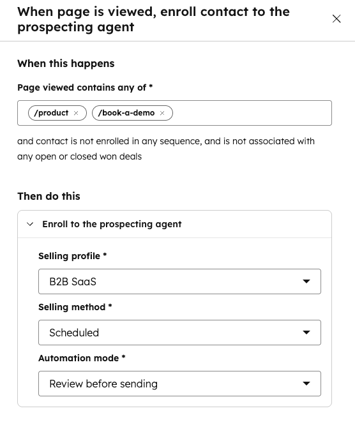
There are three entry points for enrolling a contact in a play. The agent's recommendation, based on signals detected on monitored companies. Automatic enrollment on a trigger, configured in the Automations tab: page viewed, form submitted, no engagement for a given number of days, added to a list. And manual enrollment, contact by contact or company by company, or through a workflow action. This last point matters for RevOps teams: a workflow can enroll or unenroll a contact from a play, which makes it possible to connect the agent to your existing qualification rules rather than redefining them in the agent.
Source: HubSpot knowledge base
This variety of entry points requires a governance rule: a single owner per play, and an explicit convention on what falls under the automatic play, the trigger-based play and manual enrollment by sales reps. Without this convention, the same contact can end up enrolled through two different paths in two plays with different messages.
An organizational decision before a tool decision
The question is not whether the Prospecting Agent writes good emails. It writes correct ones, and will write them better with each version. The question is who, in your organization, owns the definition of the ICP, the list of signals that deserve outreach and the rule for switching to automatic mode. If the answer is “the sales rep who activated the agent”, the setup will produce billed volume and unsubscribes. If the answer is a RevOps and sales leadership pair, with a monthly review of plays, the agent becomes a fully fledged outbound channel, with a low marginal cost and a yield that depends more on your data than on HubSpot.
A final limitation. The signals and sourcing building blocks are in beta, their scope has changed several times since the spring, and the Fall Spotlight on September 16 broadened it again. Some of the elements detailed here will need to be reviewed by the end of the year. The method, however, will not change: a narrow segment, a proprietary signal, a month of review before automatic mode.
.
Learn more
- HubSpot Sales Hub: sequences, prospecting workspace, forecast, and how the agent fits in.
- HubSpot Agent Hub: centralizing and managing your AI agents: cross-functional management of agents and their consumption.
- CRM data enrichment: automating with Breeze without polluting your database: the precautions to take before letting an agent create records.
- HubSpot agency: our support for configuring plays, segments and safeguards.